
- Role
- Lead product designer
- Company
- Personio
- Team
- PM, engineering manager, front-end and back-end engineers; design manager in the loop
- Timeline
- May 2025 – November 2025
- Results
- Shipped in the October 2025 release. We set two goals for the first quarter after release and beat both.
In short
- Context
Personio is an HR platform for small and mid-sized companies. In its time tracking product employees log their working hours; project tracking lets them log those hours against projects, so companies can bill clients, run payroll and report on time.
- Situation
Projects were a flat list of names visible to the whole company. Customers packed client, code and type into long names, kept subprojects in Excel and fixed comments by hand before reporting hours. Deals were being lost over it.
- I owned
I designed the project and subproject structure and client labels against my PM's customer groups, made the scope trade-offs with my PM and engineering manager, ran customer reviews of the Figma designs and handed the work off.
- What changed
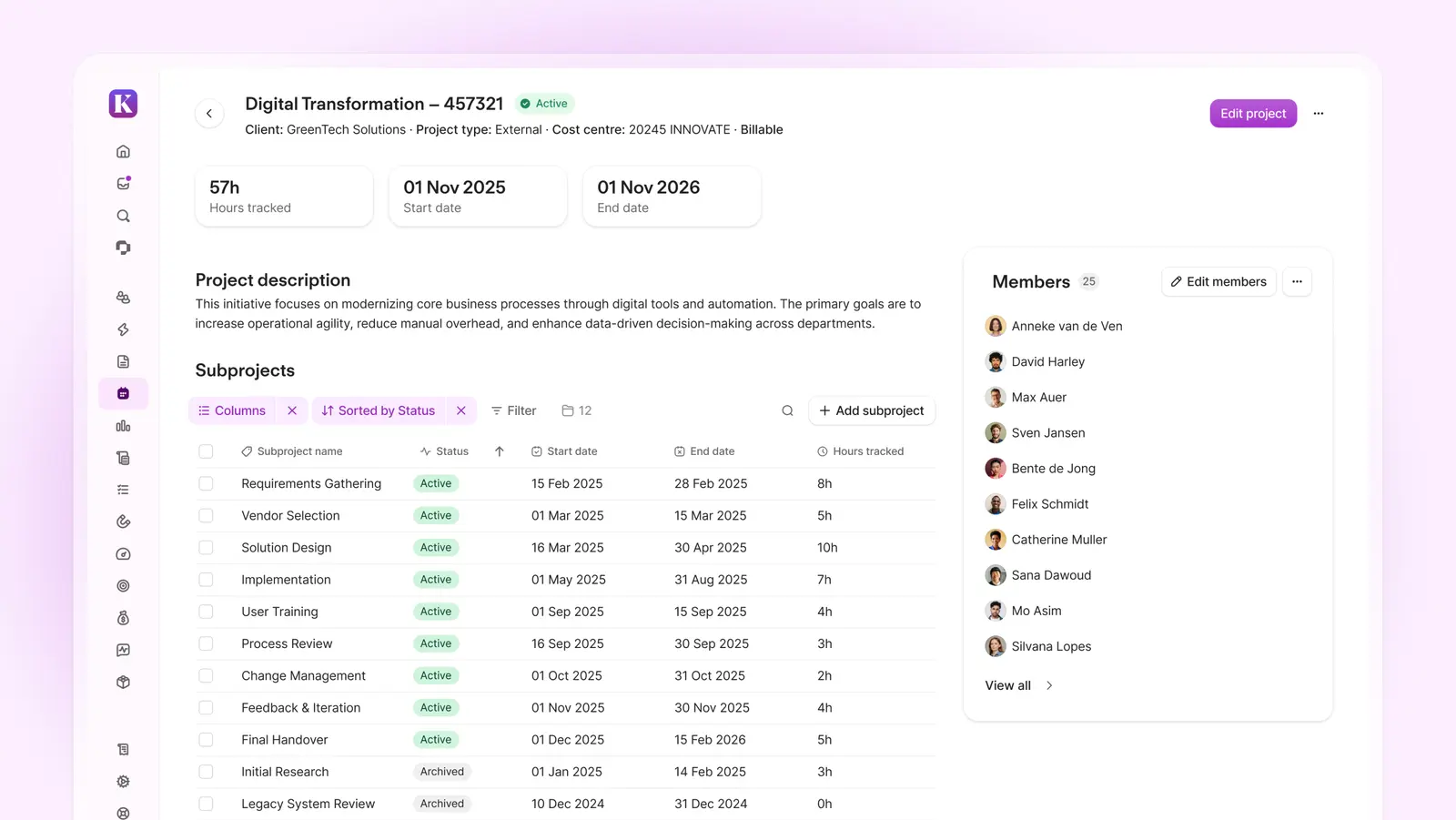
Projects with subprojects, client and billing metadata, assigned members and a details page showing hours, dates and people in one place.
The problem
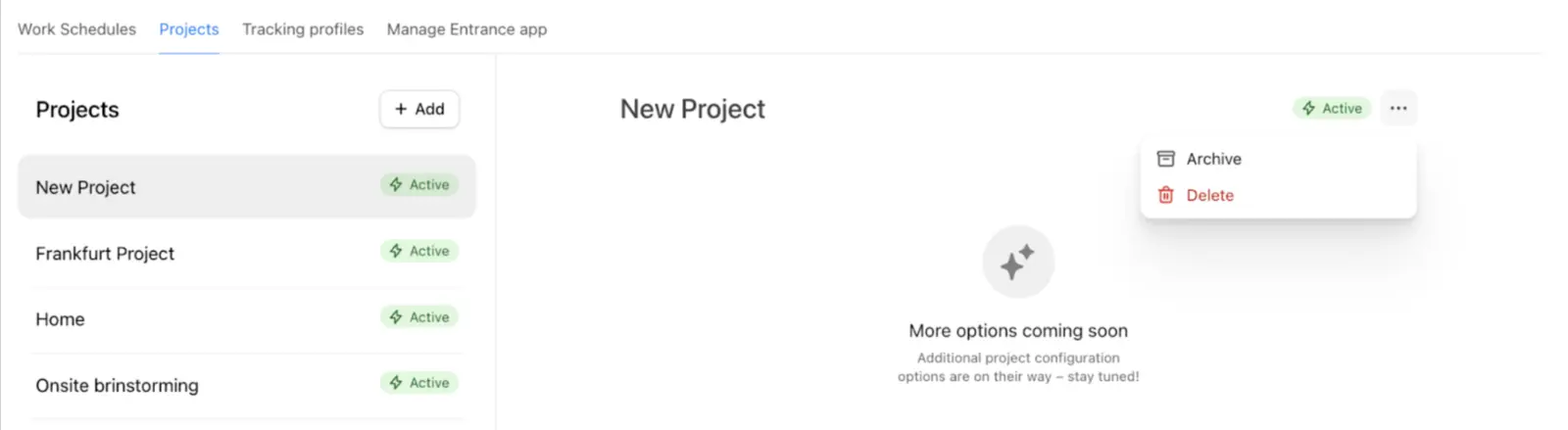
Long names and Excel on the side
A project name carried code, customer, type and name. Subprojects lived in a spreadsheet, and reports meant exporting, correcting comments and adding up totals by hand.
Easy to pick the wrong one
Long names were truncated, projects were often forgotten, and the subproject had to be typed into a comment, often misspelled.
The result was inaccurate data for auditing, tax relief, billing and payroll.
Seven decisions
Design for why companies track, not for their industry
- Situation
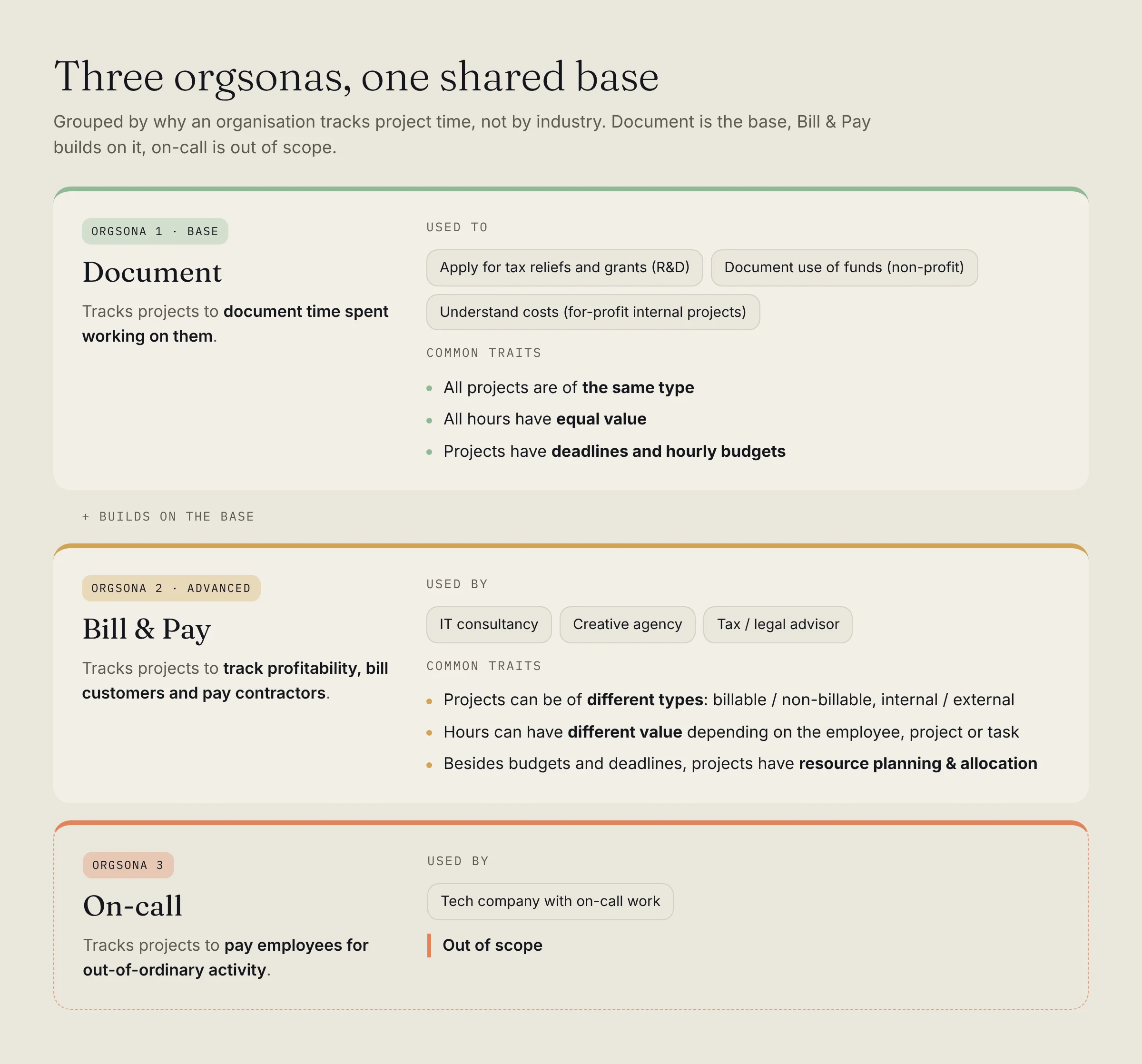
- An R&D company, a non-profit, an agency and an IT consultancy all track project time, for different reasons.
- Options
- Segment by industry, or by the job project tracking does for the organisation.
- Chose
- We used my PM's 'orgsonas', customers grouped by why they track: Document (prove where time went), Bill & Pay (invoicing, paying contractors) and On-call.
- Why
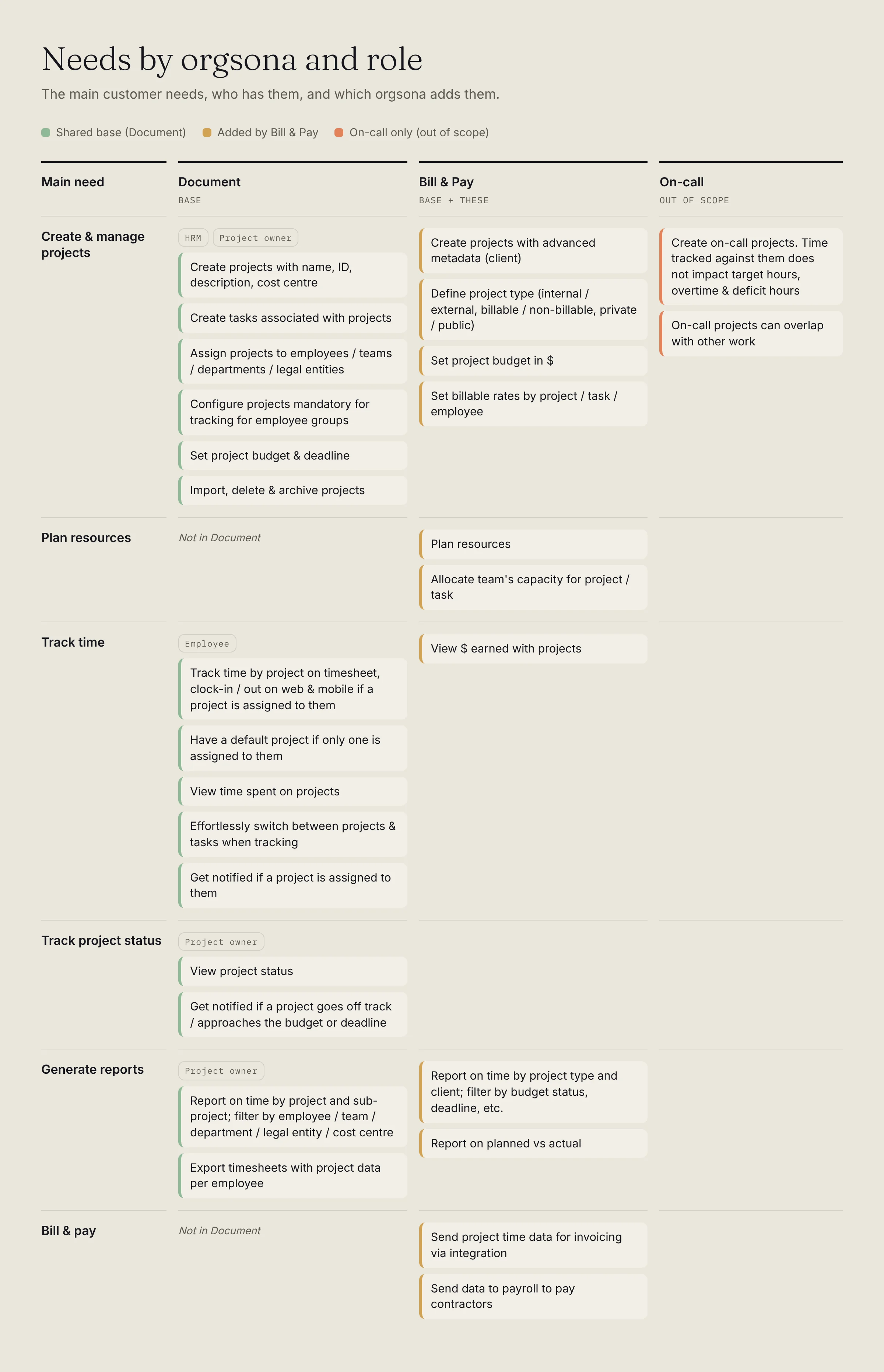
- Needs line up by motive, not sector. I mapped each group against HR, employee and project-owner needs: Document is the base and Bill & Pay adds to it.
- Gave up
- On-call time can overlap other work and not count towards target hours, so we put it out of scope.
Two levels and labels, not a planning tool
- Situation
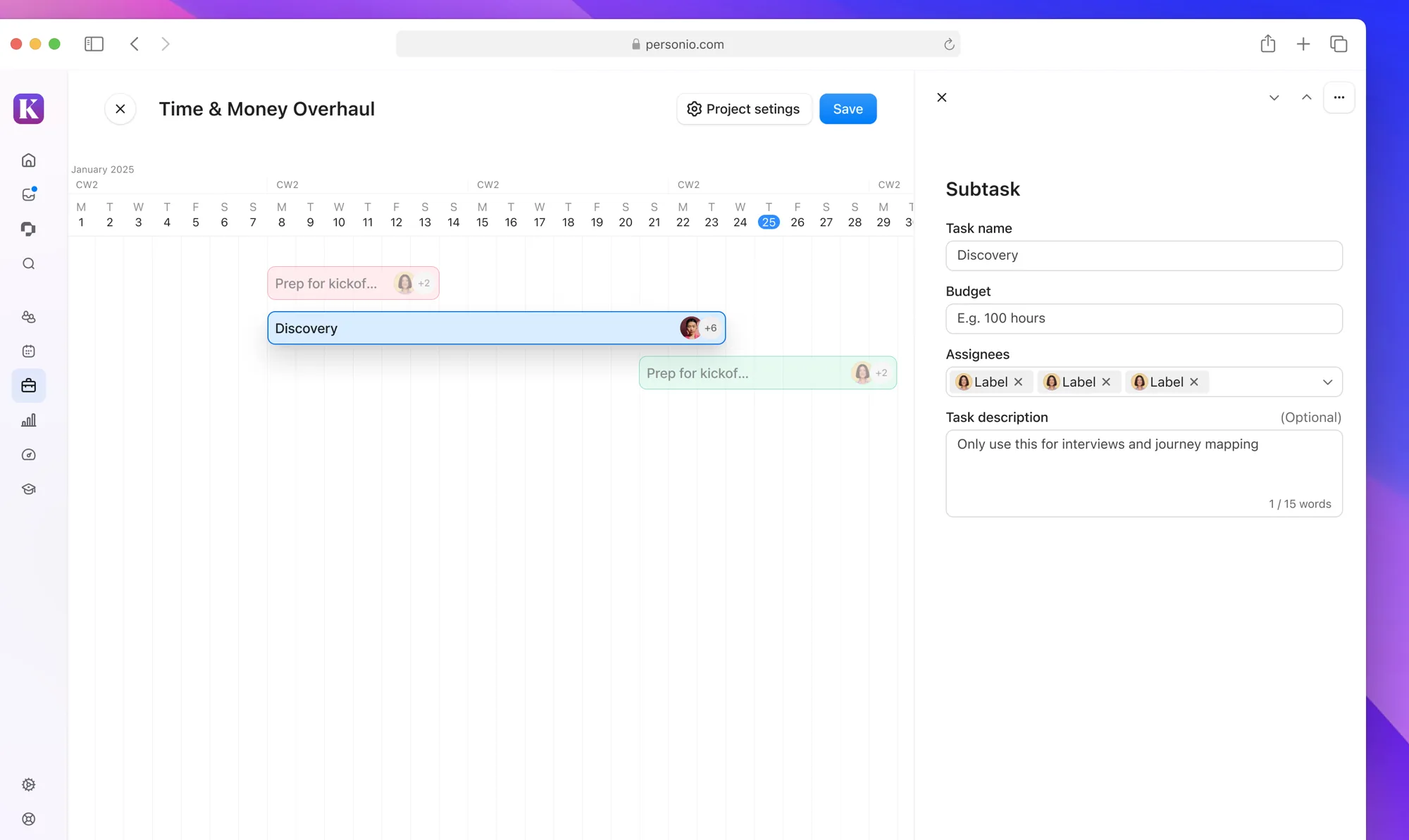
- Bill & Pay customers asked for budgets, resource planning and assignments at every level, which pulls time tracking towards project management.
- Options
- A timeline of subtasks with budgets and assignees, or projects and subprojects with labels such as client, plus import and export.
- Chose
- Project and subproject, plus labels. We descoped hourly budgets and subproject assignments from the first milestone.
- Why
- In reviews, two levels plus a client label covered a three-level hierarchy, and import and export covered the rest. One customer confirmed budgets and subproject assignments were not a must.
- Gave up
- Budgets and planning for Bill & Pay customers, who rated hourly budgets a should-have.
What a project page shows first
- Situation
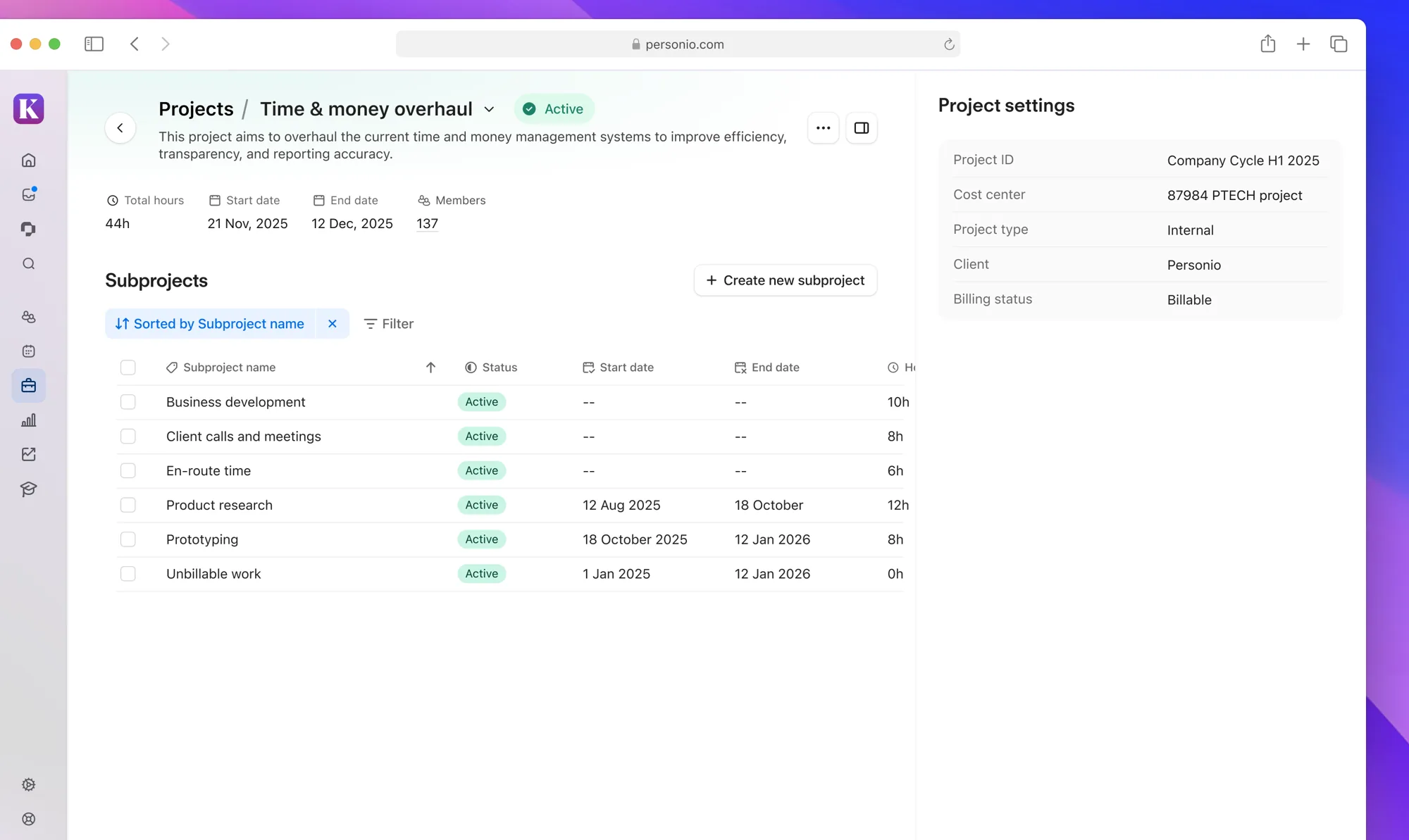
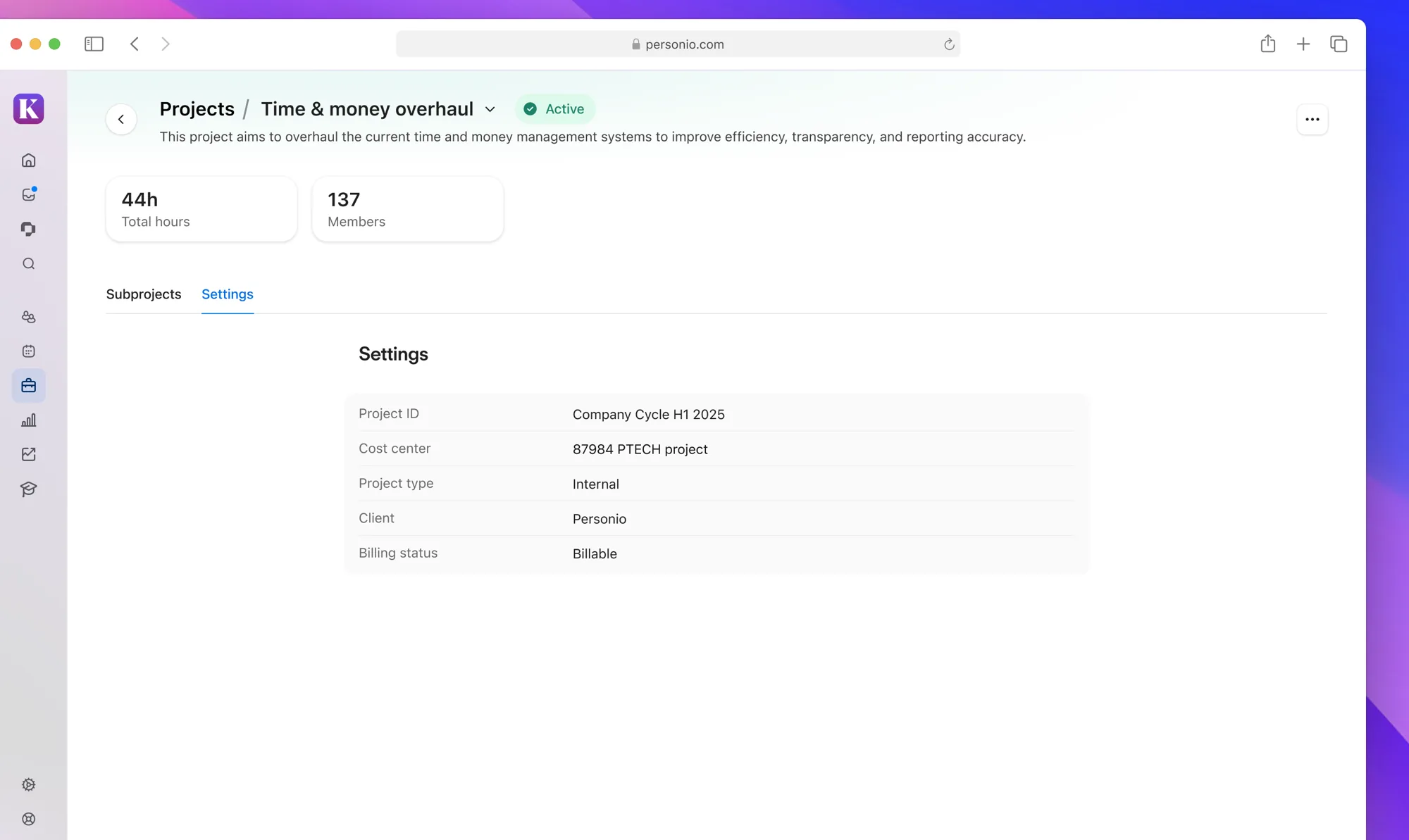
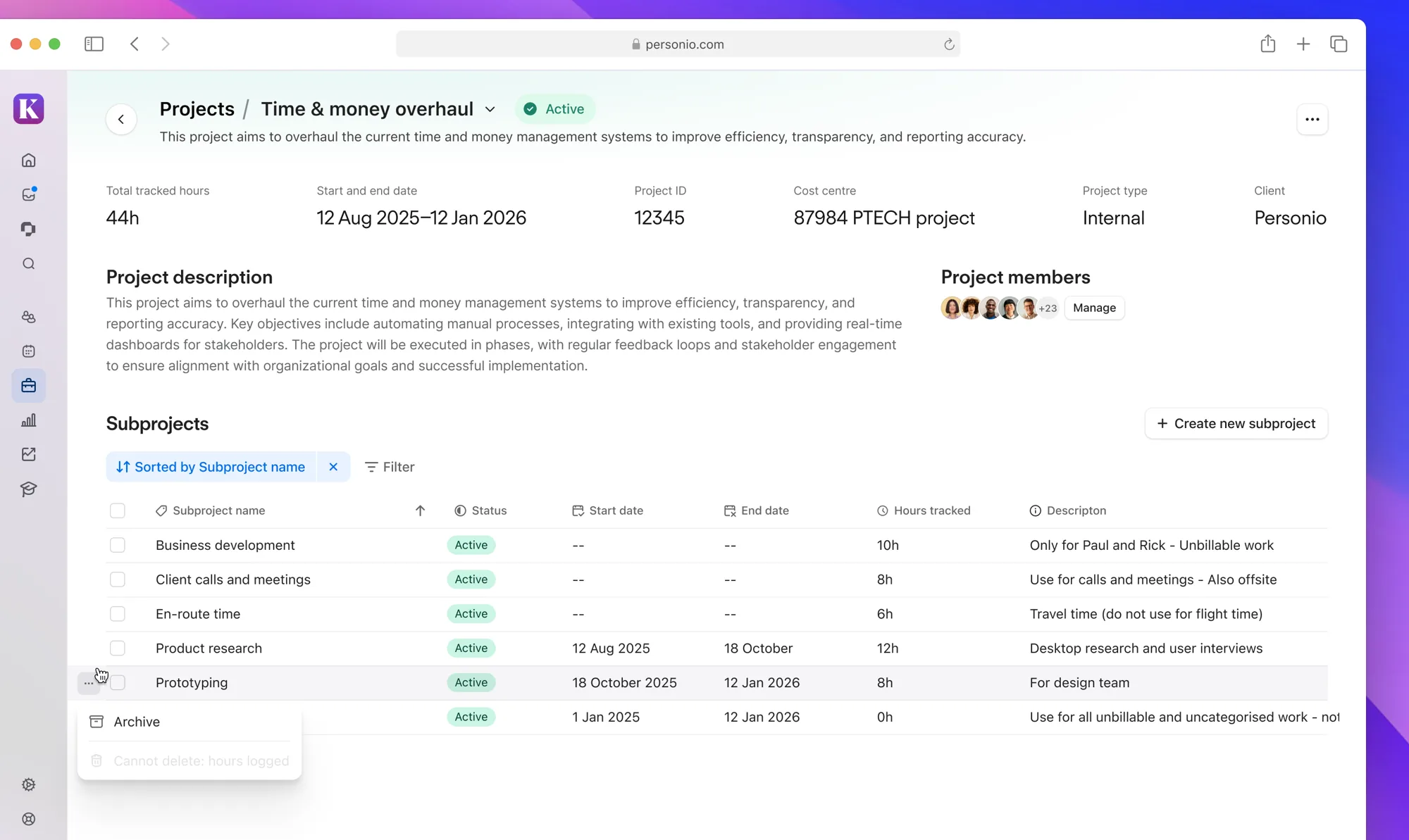
- A project carries an ID, client, type, cost centre, billing status, dates, hours, subprojects and members. Most people open it for hours or a subproject.
- Options
- Metadata in a side panel, behind a Settings tab, as equal stats, or as one line under the title with stat cards.
- Chose
- One metadata line under the title, three stat cards (hours, start date, end date), the subprojects table, and members in a right panel.
- Why
- Client and billing sit in one line, hours and dates get the most weight, and members stay on the page. A customer asked for the project ID and all configured information to be visible.
- Gave up
- A dedicated settings view; editing sits behind 'Edit project'.
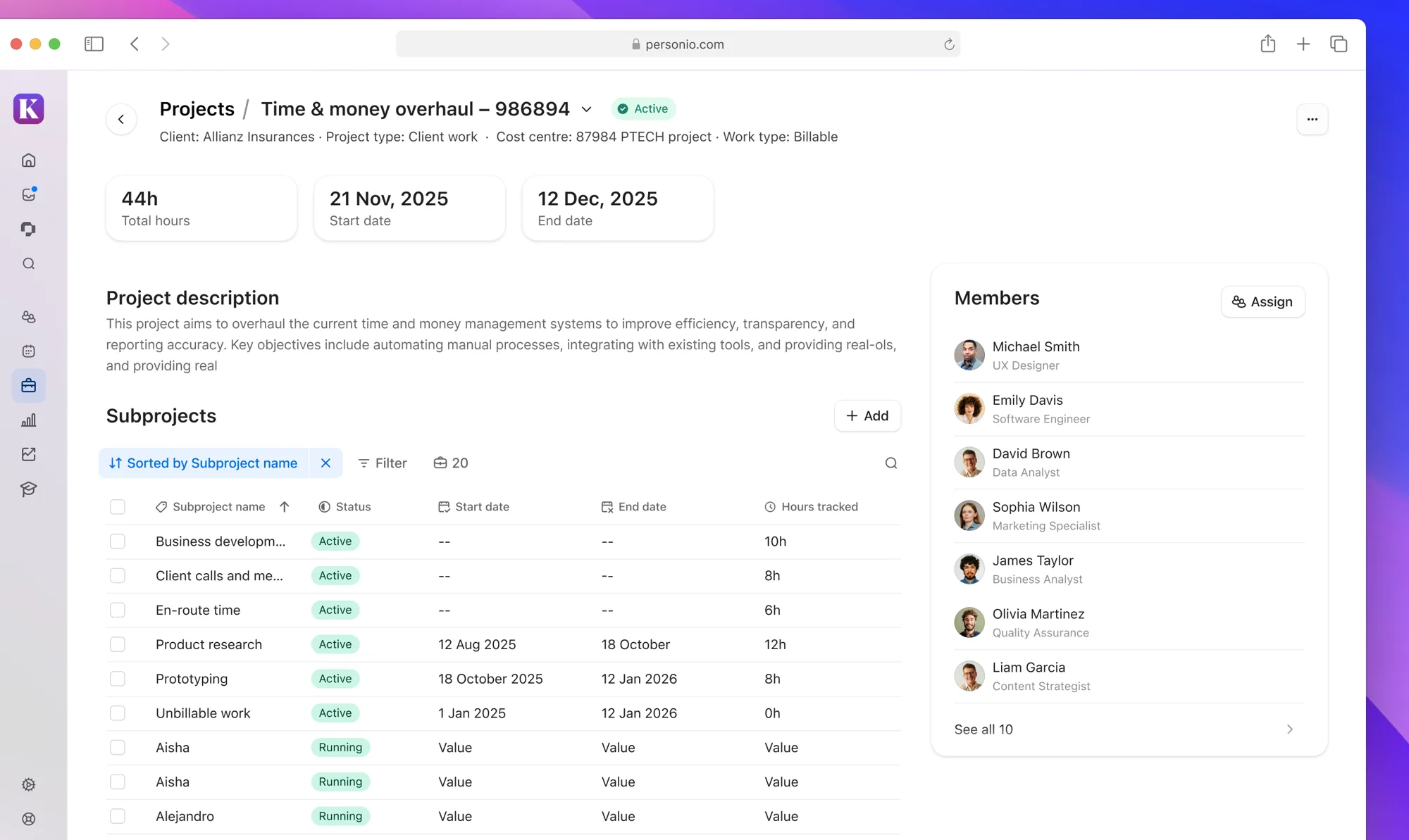
Who is on a project when nobody was chosen
- Situation
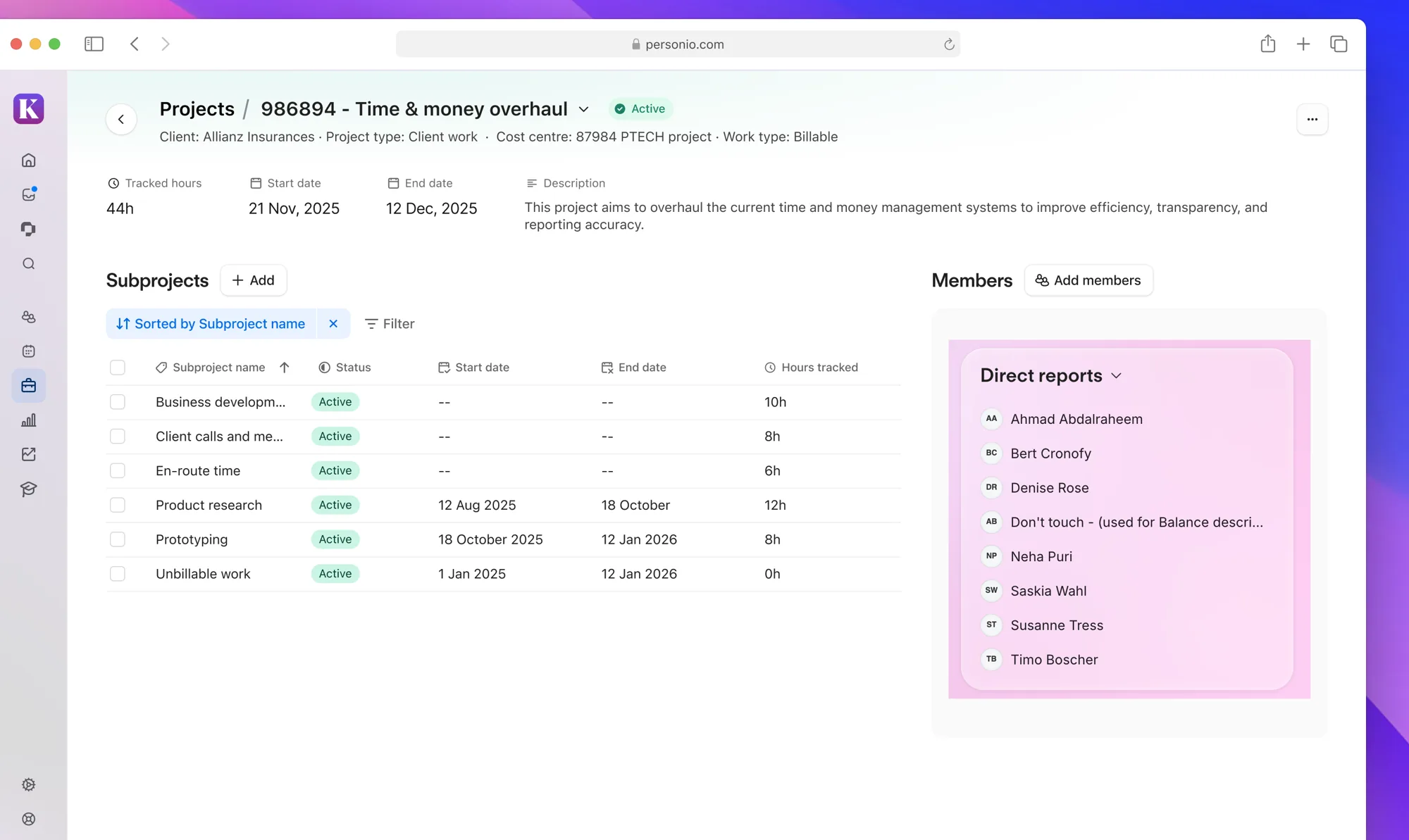
- Projects used to be visible to everyone. A members panel cannot list 300 people, and an empty one reads as broken.
- Options
- An empty state asking admins to assign people, a full list, or a plain statement that the entire organisation is assigned. Engineering ruled out one version.
- Chose
- 'Entire org is assigned to this project. New joiners will automatically be added', with the option to assign specific members.
- Why
- Projects had always been visible to the whole organisation, and the shipped message keeps everyone assigned by default.
- Gave up
- A full list of names for org-wide projects.
Empty states and limits that explain themselves
- Situation
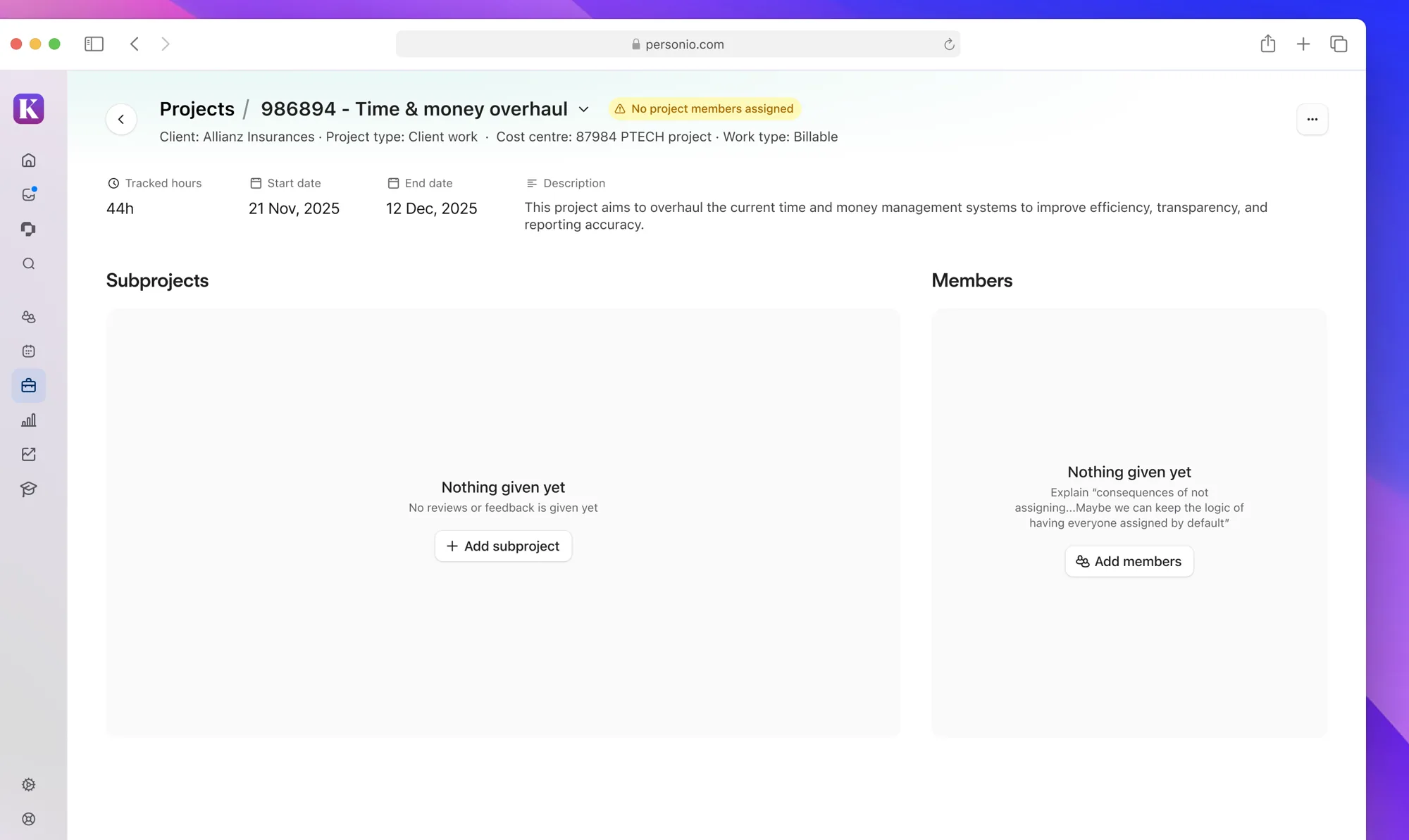
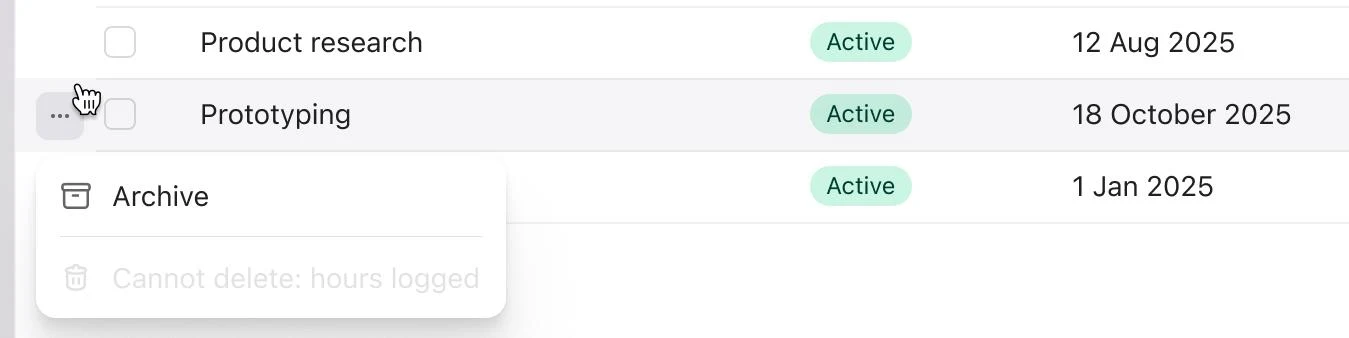
- New projects start empty, and a project with tracked hours cannot be deleted. The buddy review found this was not explained.
- Chose
- Empty states that explain the choice ('Break down your main project into smaller subprojects…'), and a disabled menu item 'Cannot delete: hours logged' next to Archive.
- Why
- Subprojects stay optional, and people see what they can do next to why they cannot do the rest.
Where Projects lives
- Situation
- Two of four customers looked for Projects under Planning, Time Off or time tracking, not Attendance.
- Options
- Move Projects, or keep it and guide people to it.
- Chose
- We kept Projects under Time Off & Attendance and added an in-product notification that tells customers where the new Projects live.
- Why
- Architecturally it is the right place in the information architecture.
- Gave up
- Some friction on first visit.
After release: timesheets, not clock-in
- Situation
- The first release tracked time on projects in the timesheet only. Our target customers are digital desk companies, who mostly fill in their timesheet at the end of the day or week. After release we had to decide whether to support projects in live tracking too.
- Options
- Add projects to clock-in and clock-out, the logical next step, or keep projects in the timesheet and move on to other problems.
- Chose
- We did not build it, and prioritised other problems that matter to our ideal customers.
- Why
- Tracking projects with clock-in and clock-out mattered to blue-collar heavy industries such as construction, a minority of our customers and not our ideal customer profile.
- Gave up
- Live project tracking for those customers.
What customers said when they saw it
Close to launch I showed four customers the Figma designs of what we were about to ship. These are pre-release reactions, not post-launch data.
- Positive on scope.One said project, subproject and a client label met their three-level hierarchy, with import and export for the rest. Another planned to import from existing systems and export to their ERP for billing. A third had feared it would be too complex and was satisfied.
- Could not find Projects.Two looked under Planning, Time Off or time tracking and found it under Attendance only after I explained (decision 6).
- Asks.Show the project ID and all configured information. Make label purposes clearer. One needs a lighter admin role for about 1,000 projects, and one did not find 'Assign to all'.
How I led and aligned
- I mapped each orgsona's needs and took the scope line to the PM and engineering manager, and we agreed to design for Document first and layer Bill & Pay on top.
- I ran the four customer reviews and brought the findings back to the triad. They confirmed the descoping of hourly budgets and subproject assignments.
- Before release I ran a launch-readiness checklist and a buddy check. Two findings blocked launch: how the 'entire organisation is assigned' state read, and unexplained blocked deletes (decision 5).
The design
What's next
- Make Projects easier to find beyond the notification.
- A lighter admin role for managing projects at scale.
- Budgets, billable rates and resource planning for Bill & Pay, and on-call tracking.
- Notify employees when assigned, and flag time tracked outside a project's dates.